Financial Dashboard Excel Template
Revenue, expenses, profit and cash flow in one interactive Excel sheet. Upload your spreadsheet and get the dashboard built from your own numbers in a few minutes.
- financial dashboard Excel
- financial dashboard template
- P&L dashboard
- cash flow dashboard
- revenue and expenses tracker
- monthly financial report
Upload your data and get this template filled in automatically
What is a financial dashboard in Excel
A financial dashboard brings the numbers a business is run on into one sheet: revenue, costs, profit and cash. Instead of reading a profit and loss statement line by line, you see the totals for the period, how they compare with the previous one and where margins are moving. Built in Excel, every figure stays a formula linked to the data sheet, so it is easy to check and update.
How to build this financial dashboard
Skip the pivot tables and the SUMIFS. The dashboard is generated inside a native Excel file:
- Attach the spreadsheet with your transactions or monthly totals.
- Pick a color palette; the financial dashboard type is already set.
- Preview every sheet of the generated workbook before paying.
- Download the .xlsx file and keep it up to date with new months of data.
What to include in a financial dashboard
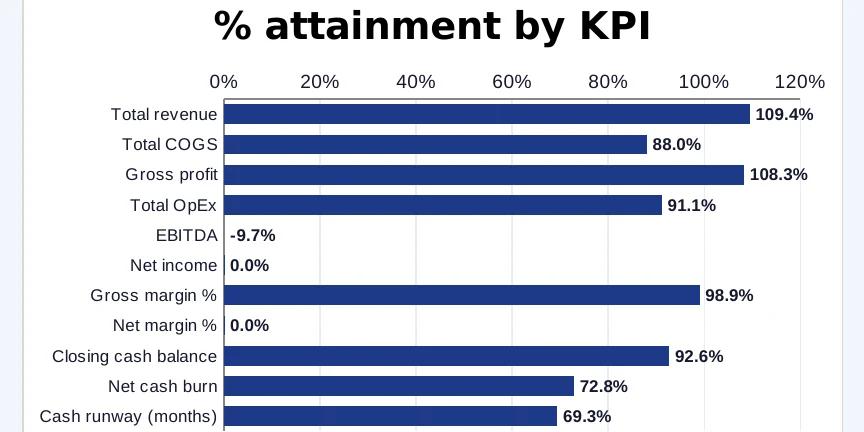
Lead with revenue, gross profit, operating expenses and net income for the selected period, then cash balance at period end. Show revenue by stream or product so it is clear where growth comes from, and margins as a trend rather than a single number. If you have a budget, put it next to actuals: the gap matters more than either figure alone.